
Press Kit
MinTask
Focus on what truly matters.
A calm task manager for iPhone and iPad, built on the Eisenhower Matrix and Getting Things Done. Capture anything in seconds, then MinTask helps you decide what to do now, what to plan, what to hand off and what to let go.
The idea
Urgent is not the same as important.
Most to‑do apps give you one endless list. MinTask asks two questions about every task — is it urgent? is it important? — and the answers place it in one of four quadrants. That is the whole system.
Urgent · Important
Do
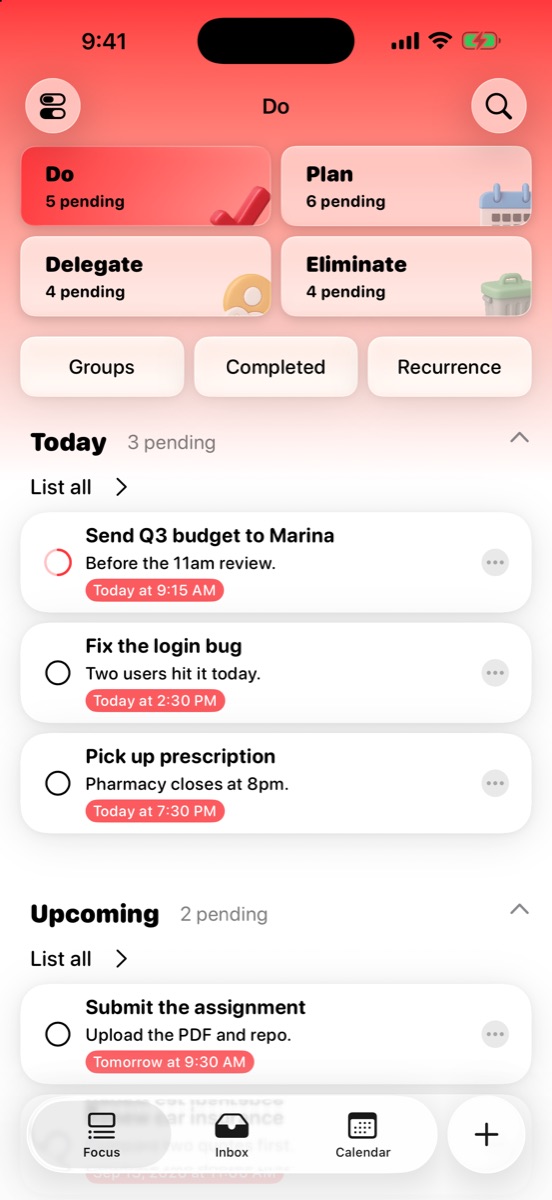
Handle it today. The short list that actually needs you right now.
Important · Not urgent
Plan
Give it a date. This is where real progress lives — and it moves up to Do on its own as the deadline gets close.
Urgent · Not important
Delegate
Hand it off or batch it, so it stops interrupting the work that matters.
Not urgent · Not important
Eliminate
Let it go without guilt. Saying no is part of the plan.
How it flows
Capture. Clarify. Act.
MinTask borrows the best part of Getting Things Done: get it out of your head first, decide later.
01
Capture
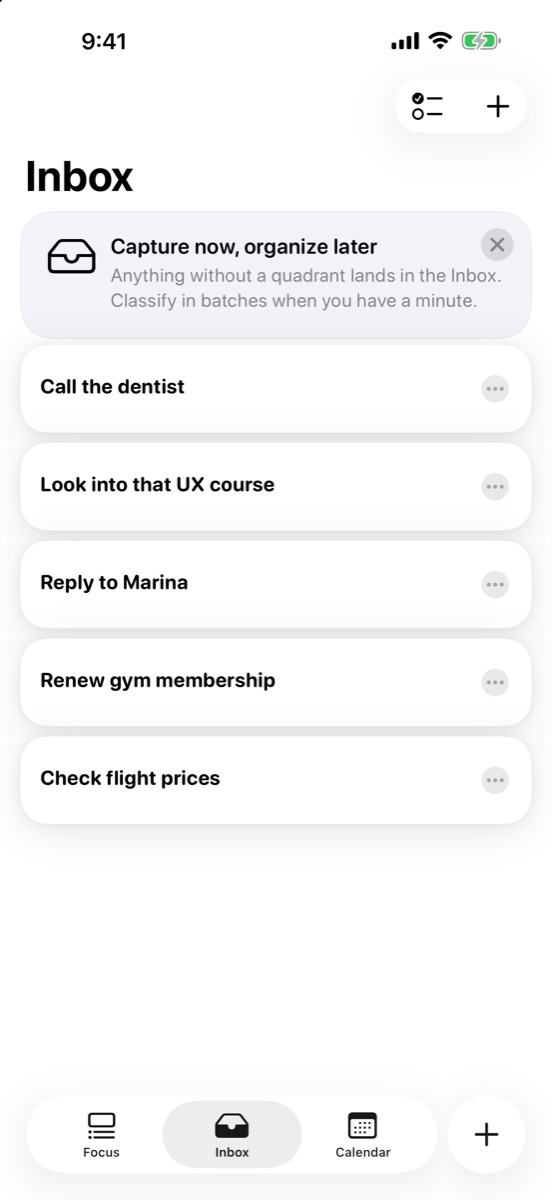
Drop anything into the Inbox. No quadrant, no date, no friction — just the thought, saved.
02
Clarify
When you have a minute, a guided flow sorts the Inbox in batches: urgent? important? Done.
03
Act
Open Focus and work the quadrant that matters now, with today, upcoming and overdue at a glance.
Features
Powerful when you need it.
Quiet when you don’t.
Focus
Four quadrants, one glance.
The Focus screen shows how many tasks wait in each quadrant and what is due today, upcoming and overdue. Pick a quadrant and the whole screen takes on its color, so you always know where you are.
Inbox
Capture now. Organize later.
Anything without a quadrant lands in the Inbox. It is the fastest place to empty your head, and the guided sorting flow turns a messy pile into a clear plan in a few taps.
New task
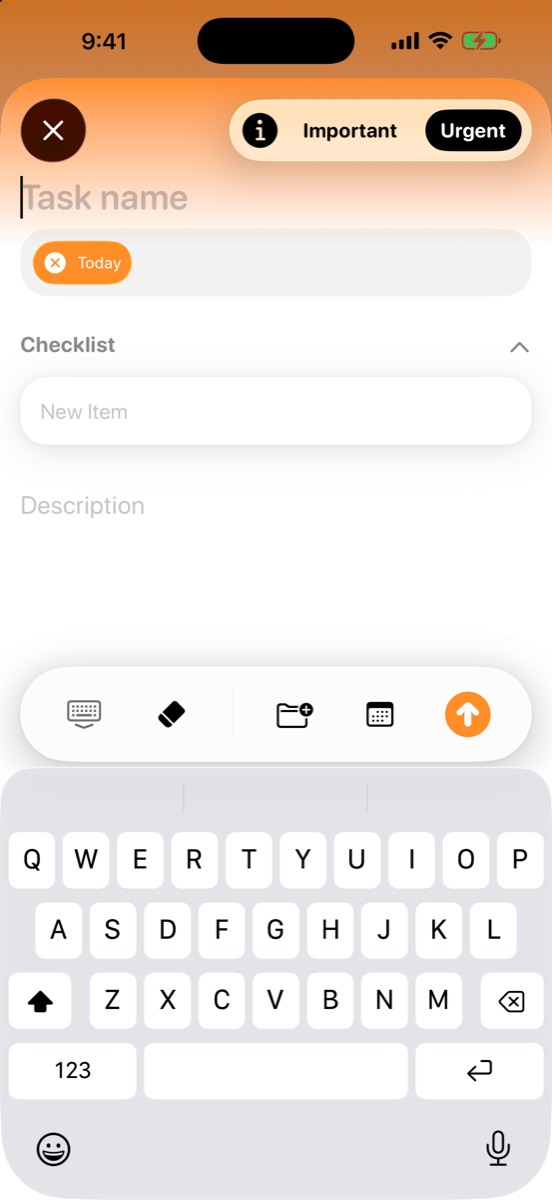
Two taps to prioritize.
Mark a new task Important, Urgent, both or neither right in the composer and MinTask files it in the right quadrant. Add a checklist, a date, a project and a note without leaving the keyboard.
Calendar
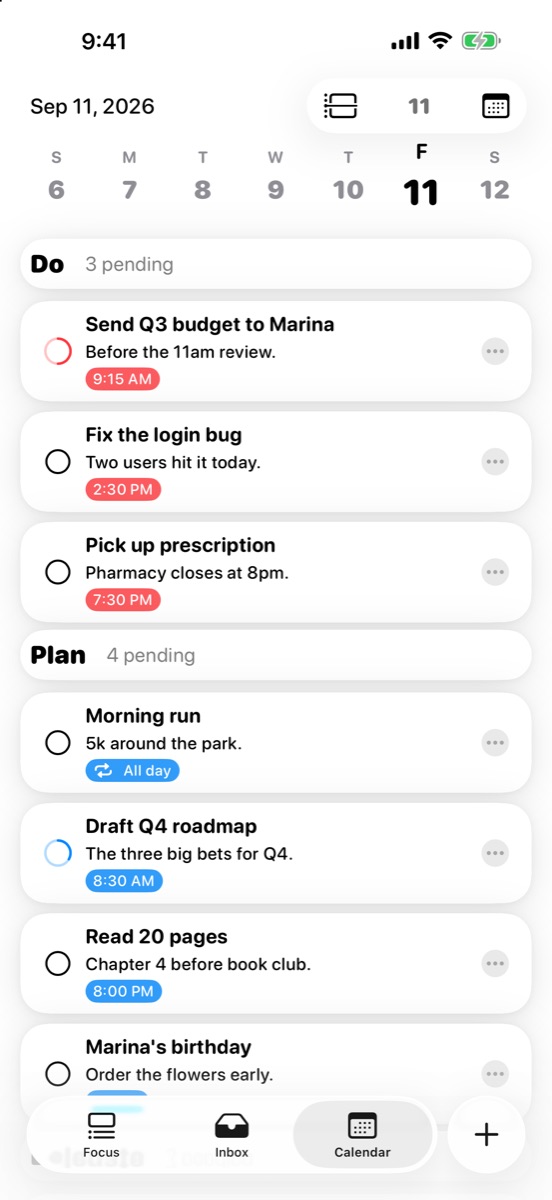
Your day, sorted by priority.
List and timeline views group every day by quadrant, so even a packed Thursday tells you what comes first. Recurring tasks — daily, weekly or monthly — show up where they belong and can be paused.
Widgets
Priorities on your Home Screen.
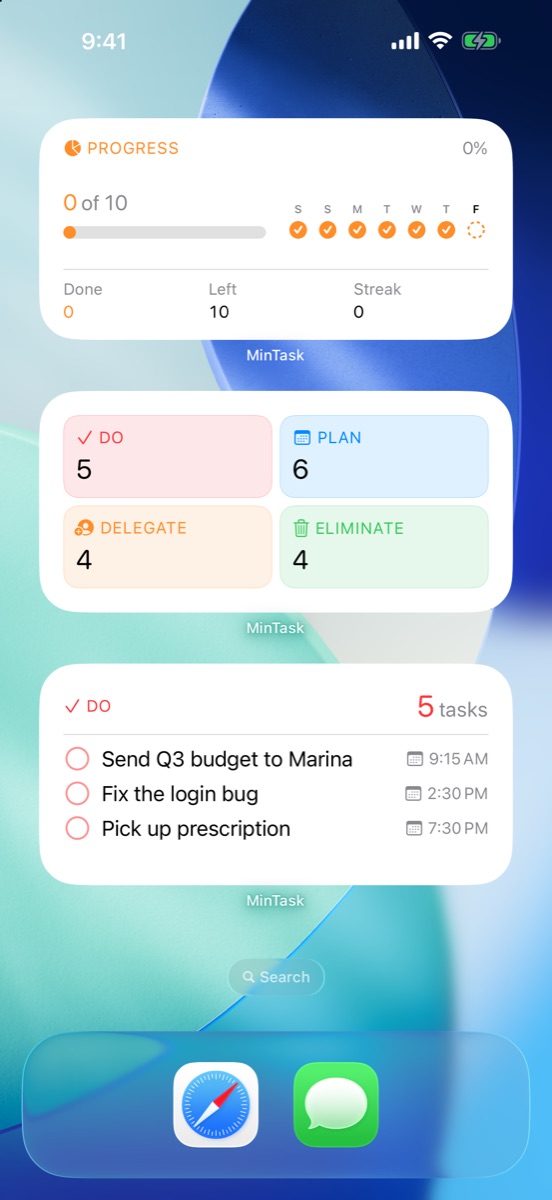
Progress, matrix and quadrant widgets for the Home and Lock Screen keep the day in view without opening the app — including an extra-large widget on iPad.
SiriPRO
Create and manage tasks with your voice. Requires iOS 27.
Apple IntelligencePRO
Smart features that run on device, so your tasks stay on your iPhone.
AlarmsPRO
Alarms that ring even on silent, with a Live Activity countdown.
ProjectsPRO
Group related tasks into projects, each with its own matrix.
iCloud sync
Private sync across iPhone and iPad through your own iCloud.
Recurring tasks
Daily, weekly or monthly routines that you can pause anytime.
Made for iPad
Sidebar, multiple windows and keyboard shortcuts.
Search & archive
Search with priority filters, and an archive that cleans itself.
Unfold. Every priority
gets room to breathe.
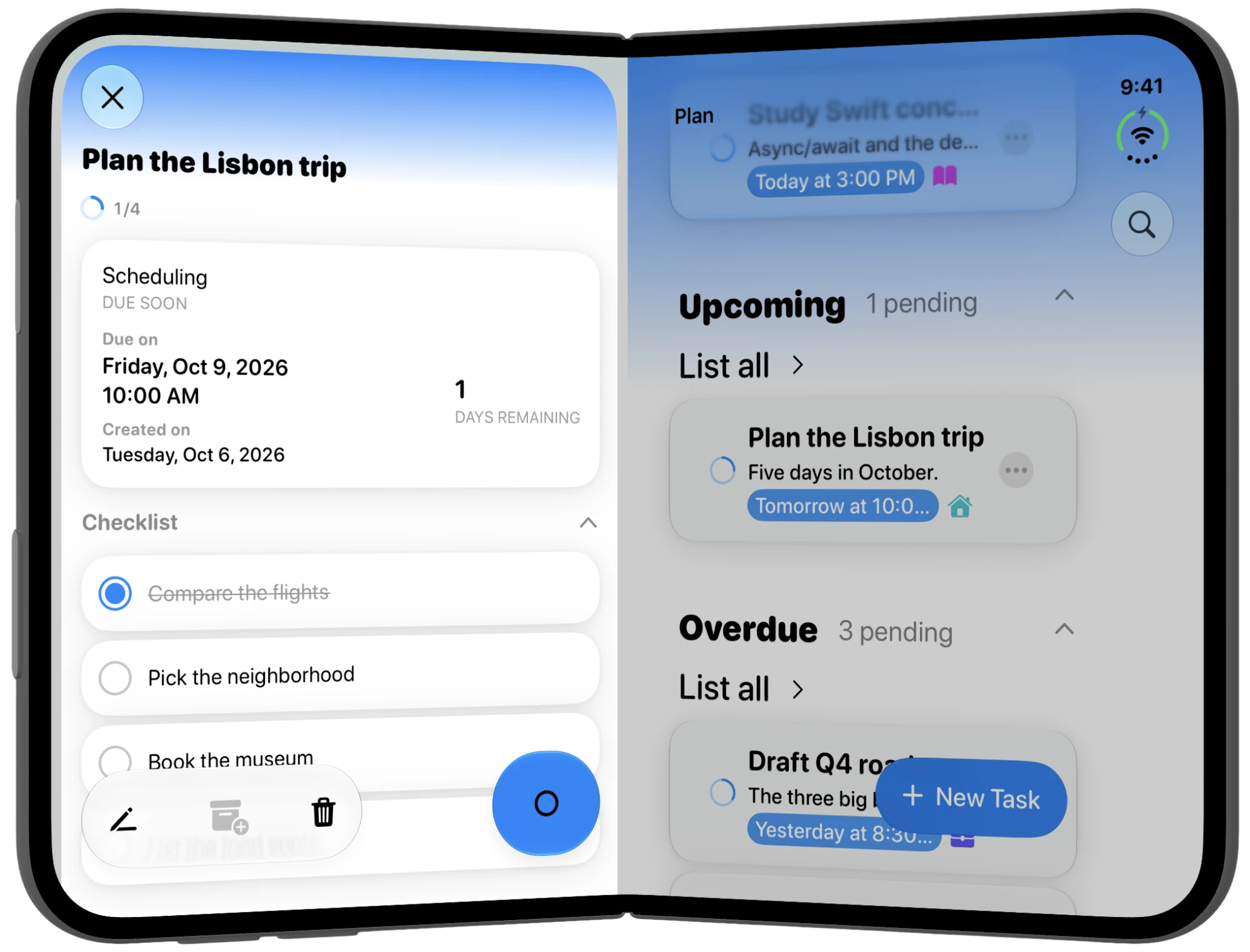
On the large inner display of iPhone Duo, MinTask spreads across both halves, keeping your list and the task you are working on in view at once. Fold it, and you are back to the familiar one‑handed iPhone app.
Detail and list, side by side.
Open a task on one half — due date, progress and checklist — while the list stays in view on the other. No more jumping back and forth.
Same app, two shapes.
The layout follows the device as it folds and unfolds, so the closed iPhone experience stays exactly as it is.
Folded, it’s all still there.
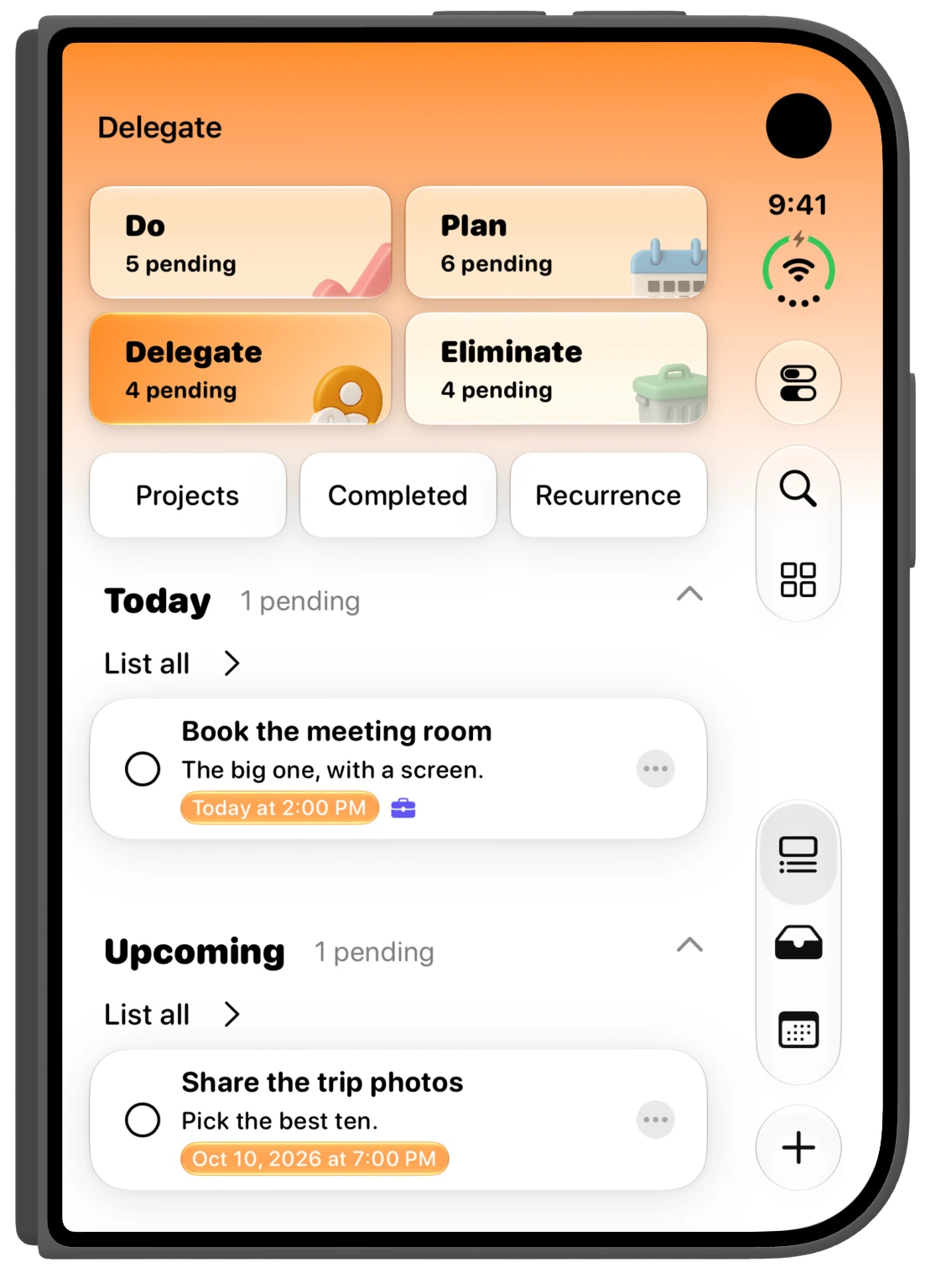
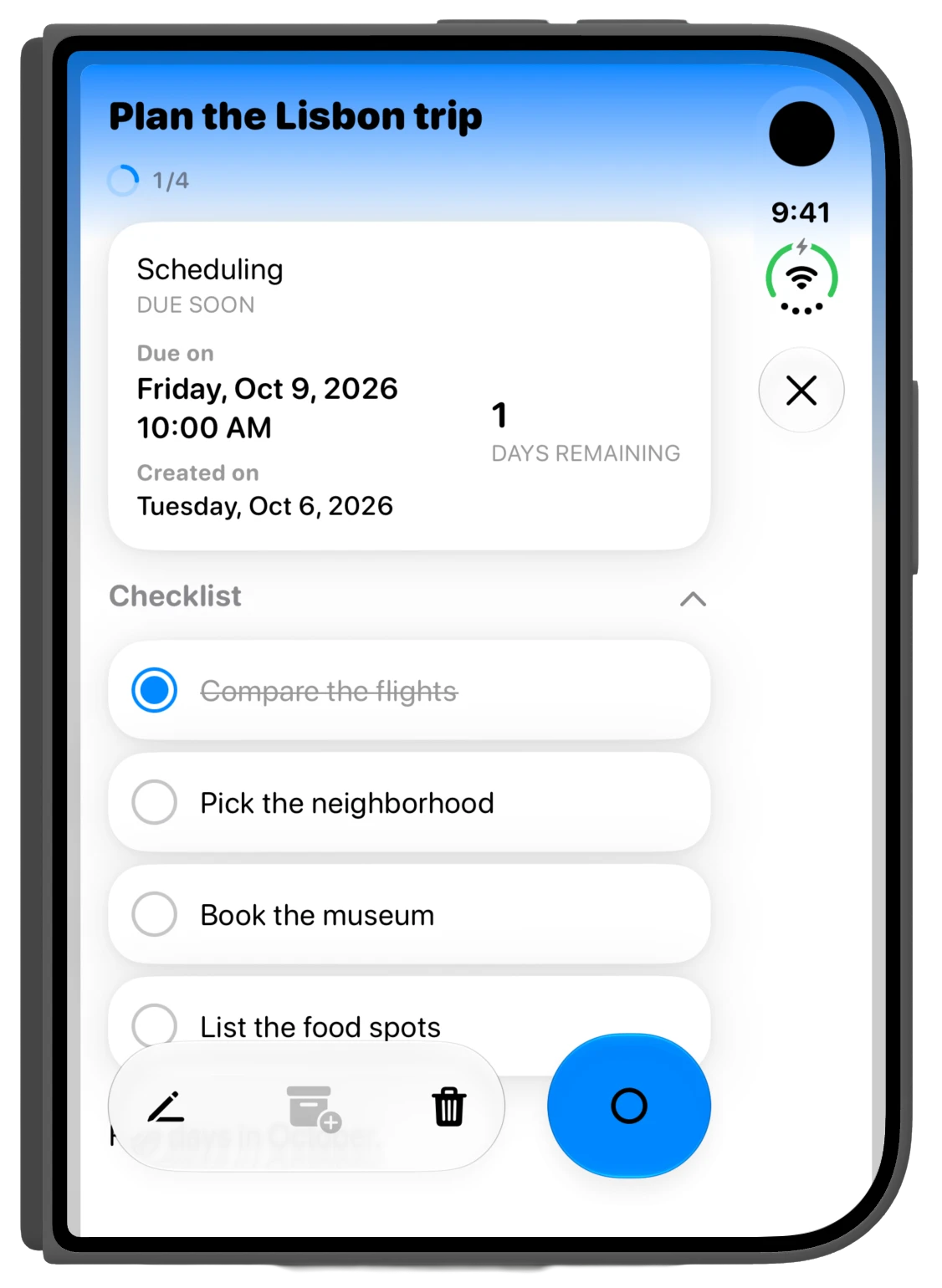
On the outer display, navigation moves to a slim vertical bar beside the content, leaving the full width for your tasks.
Privacy
Private by design.
No account.
Open the app and start. There is no sign‑up, email or password.
No tracking, no ads.
Your to‑do list is not a product. Nothing to opt out of.
Your data, your iCloud.
Tasks live on your devices and sync through your own private iCloud.
Pricing
Free to start. Pro when you want more.
MinTask
Free download
- Eisenhower Matrix with a built‑in guide
- Inbox with guided sorting
- Subtasks, notes and recurring tasks
- Reminders and a daily review
- Calendar, search and self‑cleaning archive
- iCloud sync, iPad and iPhone Duo layouts
MinTask Pro
$1.99 / month · $9.99 / year · $49.99 lifetime (US)
- Alarms with Live Activity countdown
- Home and Lock Screen widgets
- Groups and projects
- Apple Intelligence features, on device
- Siri voice commands (iOS 27)
- Alternative app icons
Fact sheet
At a glance.
- App name
- MinTask
- App Store title
- MinTask GTD – Task Manager
- Developer
- Rafael Ramos, independent developer
- Category
- Productivity
- Platforms
- iPhone, iPad, iPhone Duo
- Requires
- iOS / iPadOS 26.1 or later. Siri features need iOS 27.
- Price
- Free, with optional MinTask Pro
- Languages
- English, Portuguese, Spanish
- Age rating
- 4+
- Website
- mintask-site.pages.dev
- App Store
- apps.apple.com/app/id6477445612
- Press contact
- newrafaindieapp@gmail.com
In one line
MinTask is a minimalist task manager for iPhone and iPad that sorts your to‑dos with the Eisenhower Matrix.
About MinTask
MinTask helps busy people separate what is urgent from what is truly important. Every task lands in one of four quadrants — Do, Plan, Delegate or Eliminate — and an Inbox inspired by Getting Things Done makes capturing a thought take seconds. With a priority‑aware calendar, recurring tasks, reminders, widgets, Siri and on‑device Apple Intelligence, MinTask turns a long list into a short, clear plan. It works without an account, has no ads or tracking, and syncs privately through iCloud across iPhone, iPad and iPhone Duo.
Brand
Icon and colors.
The icon stacks the four quadrant colors behind a single check mark. Inside the app, each quadrant keeps its color everywhere it appears.
Do
#FF3B30
Plan
#007AFF
Delegate
#FF9500
Eliminate
#34C759
Please don’t alter the icon’s shape or colors. Write the name as “MinTask” — one word, capital M and T.
Assets
Download everything.
Full‑resolution PNGs, free to use in coverage of MinTask.
Let’s talk.
Review copies, interviews and questions are always welcome.